DiscoverItLegal

Collection. Review. Production.

Defensible
discovery.
In your hands.

From the first collection to the final production.
Three tools. One clear path through the evidence.
All on computers you control.

Local processing. No outside AI service.

THE EVIDENCE, IN FOCUS01 — 04
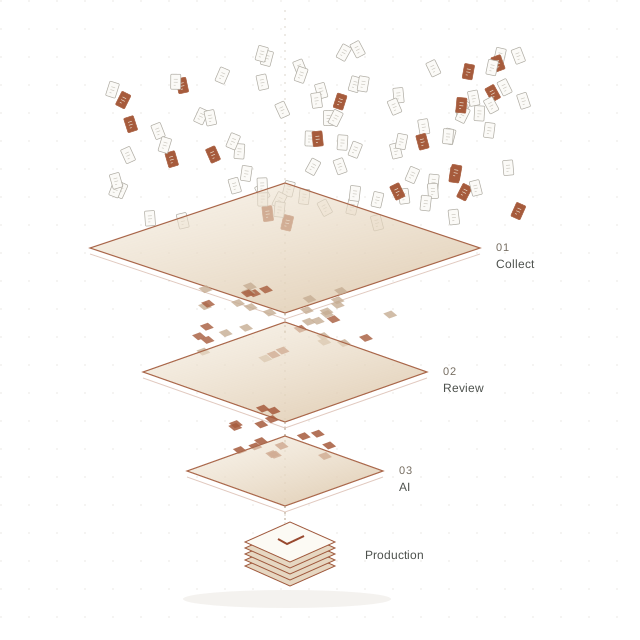
Many scattered documents pass through three layers and become a small, ordered production.
Less noise. More clarity.Illustrative workflow
YOUR EVIDENCE.
YOUR ENVIRONMENT.
01 DFYCollect02 DFYReview03 DFYAIProduction ↗

Follow the evidence

The volume changes.
Your control doesn’t.

Scroll through the journey from scattered files to selected documents.

Skip the animation ↓
01DFYCollectAvailable now

Find the evidence
hidden in the volume.

Mail stores. Nested attachments. Scanned pages. Bring the scattered evidence into a searchable collection, with every unreadable file accounted for.

Collect · Recover text · Search
Explore DFYCollect
02DFYReviewEarly access

Every document.
A considered decision.

Search by keyword or meaning. Code, redact, and build a production with a privilege log. Keep a record of who made each decision and what it changed.

Search · Code · Redact
Explore DFYReview
03DFYAIIn development

Follow the facts.
See the connections.

Ask questions in plain English, with links to the documents behind each answer. Explore who communicated with whom, with AI running on machines you control.

Ask · Trace · Understand
Preview DFYAI
04The productionYour selected documents

A focused production.
A traceable process.

Move from a large collection to the documents selected for production. DFYCollect and DFYReview support production; use the tools independently or together.

Selected · Reviewed · Produced
See it on your documents

Evidence, not promises

Real documents.
A real run.

Discovery goes wrong when documents slip through: a scan nobody could search, an attachment buried three layers deep, a gap nobody noticed until the other side did.

Here is DFYCollect partway through the public Enron email collection, on one computer.

Look under the hood ↗

The three tools

From raw data to review, on your own computers

Use one, two or all three. DFY stands for Discover For Yourself.

01 · CollectAvailable now

DFYCollect

Gathers and produces the evidence, including the documents other tools skip.

What it does

  • Opens mail stores, zip files and documents inside documents
  • Reads scans
  • Runs new search terms without starting over
  • Runs on your computers
  • Lists every file it couldn't read, and why
Explore DFYCollect →
02 · ReviewEarly access

DFYReview

Review and produce on the computers your team already has.

What it does

  • Searches by keyword or by meaning
  • Codes, redacts and produces, with a privilege log
  • The document on its own screen, if you have two
  • Shared with your team over the office network
  • Every coding decision on record
See DFYReview →
03 · Review with AIIn development

DFYAI

AI-assisted review, running on machines you control rather than in the cloud.

What it does

  • Plain-English questions, with links to the documents behind each answer
  • Who communicated with whom
  • Nothing sent to an outside AI service
  • On an appliance we supply, or we stage the review for you
Preview DFYAI →

Side by side

Which tool does what

Each one works on its own, and each hands its work to the next.

DFYCollect DFYReview DFYAI
Status Available now Early access In development
For Collecting, searching and producing the evidence Reviewing and producing it on your own computers Reviewing it with AI to help
Highlights Opens mail stores, zip files and documents inside documents. Reads scans. New search terms without starting over. Loads any production. Searches by keyword or by meaning. Codes, redacts and produces, with a privilege log. Plain-English questions, with links to the documents behind each answer. Who communicated with whom.
Runs on Your computers Your computers, shared over the office network A review appliance we supply and maintain, or we stage the review for you
AI None No generative AI; search by meaning uses a small model on the computer's own processor Models running on local machines; nothing is sent to an outside AI service
Explore DFYCollect → Ask about early access → Ask about early access →

What you can stand behind

Why lawyers can rely on it

A search that quietly skips four thousand unreadable files looks exactly like one that read them all, unless the software tells you.

01

You know what was missed

Every file that couldn't be read is listed with the reason, so you find the gaps before the other side does.

02

You can explain every choice

In DFYCollect, each document records why it was picked: its date, its location or its words.

03

No quietly incomplete work

If something would make the results incomplete, DFYCollect stops and says so rather than handing you a set that only looks finished.

04

Your evidence stays private

All three run on local machines, never in a public cloud, and none sends a document to an outside AI service.

05

Every review decision is on record

DFYReview and DFYAI record every coding decision: who made it, when, and what it changed. A batch coded in one step keeps the search that picked it.

06

You know who saw what

An administrator can turn on the access log for a matter, and DFYReview and DFYAI then record who opened each document and when.

We tell you our limits

Every product page has a section called Current limits, in plain words. It's the part most vendors leave out, and the part you need most when deciding.

DFYCollect

Collection

Changing the terms of the original collection means running it again. Searching the finished collection again does not.

Read DFYCollect's limits →

DFYReview

Review

No generative AI: nothing summarises, answers questions or writes for you. Search by meaning runs on the computer's own processor.

Read DFYReview's limits →

DFYAI

Review with AI

Reading a production for people and facts is slow: about twenty-two days of GPU time for 31,000 documents, so it is run over a chosen scope.

Read DFYAI's limits →

Try it

See it on your own documents

Bring a production, or let us collect one, and we'll show you what each tool finds, on computers you choose.